White Noise Machine vs App: Which is Best for Focus and Sleep?
Protecting your attention at a desk or preserving your deep rest at night is a continuous battle against external sensory inputs. Unexpected car alarms, household foot traffic, text alerts, or nearby office conversations continuously compete for your working memory capacity. Every time a sharp background sound breaks through your environment, your brain suffers an involuntary shift in attention, draining cognitive energy.
To stop this mental drag, millions of people use acoustic masking—playing uniform, continuous sound frequencies to hide unpredictable environmental noises.
However, setting up an auditory shield introduces a key functional choice: should you purchase a dedicated white noise machine or use a smartphone application?
While both options deliver continuous background frequencies, they approach your sensory environment through completely different hardware capabilities, behavioral habits, and audio qualities. Choosing the wrong setup can introduce digital distractions into your day or cause severe smartphone battery drain. Here is a practical, side-by-side evaluation to help you match your needs to the right tool.
Core Operational Differences Explained
Understanding the mechanical differences between these options explains why they produce distinctly different environments over long, daily sessions.
-
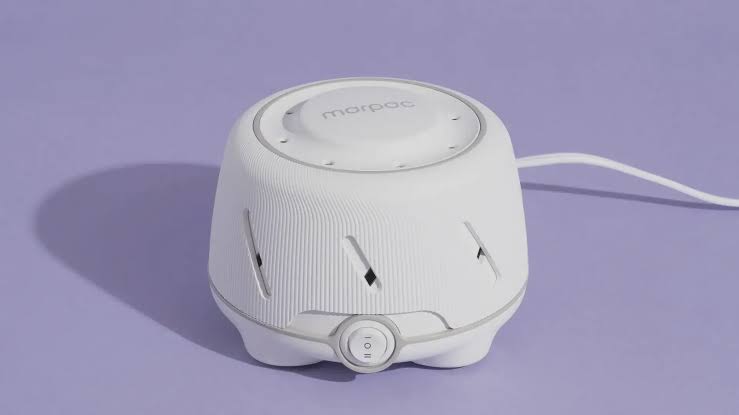
White Noise Machines (Dedicated Hardware): These standalone physical appliances are engineered for a single purpose: consistent sound generation. They split into two groups: mechanical options (which use an internal physical fan to blow air through slots, creating a natural sound) and digital options (which use a speaker to play pre-recorded, non-looping digital sound files).
-
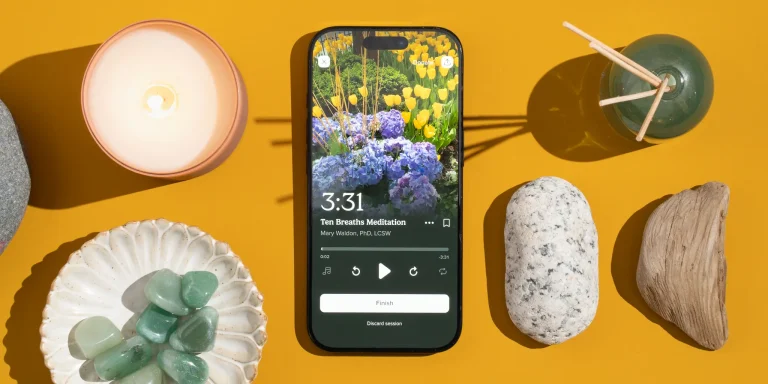
White Noise Apps (Software Applications): These digital apps run on your smartphone, tablet, or smart home speaker. They leverage your existing hardware to loop ambient track files, pink noise variations, or customized sound mixes. They are highly flexible but operate inside an ecosystem built around interactive digital alerts.
Direct Mechanical Comparison Matrix
The table below outlines how standalone hardware platforms compare directly to mobile software choices.
| Feature Criterion | Standalone Hardware Machine | Mobile Software Application |
| Acoustic Fidelity | Superior; large, resonance-tuned speaker cavities | Limited; built for voice frequencies, can sound bright |
| Distraction Risk | Zero; physical buttons with no screen access | High; invites touch-screen browsing and alerts |
| Audio Looping Architecture | True non-looping generation or long tracks | Prone to short digital loop seams that break focus |
| Portability Factor | Moderate; requires suitcase space and plug access | Maximum; always active inside your mobile pocket |
| Initial Cost Scale | $25 to $70 upfront investment | Free basic options / $10–$40 annual premium tiers |
1. Standalone White Noise Machines: The Defensive Physical Shield
Standalone machines are built for environments where you need absolute reliability, maximum sound masking volume, and zero connection to the internet.
┌────────────────────────────────────────────────────────────────────────┐
│                        HARDWARE ISOLATION INTERFACE                    │
└────────────────────────────────────────────────────────────────────────┘
  [Physical Switch On] ──► Immediate Deep Frequency Blanket (No Screens)
                                 │
                                 ▼
  [Acoustic Outcome]   ──► Complete speech masking, zero network lag,
                           and zero notifications.
-
The Advantages: Deeper sound resonance. Hardware options like the LectroFan EVO ($65) utilize large internal digital sound generators that produce non-repeating noise patterns. Because the speaker enclosure is physically larger than a phone, it outputs deeper low-frequency rumbles (brown noise ranges) that mimic waterfalls or large fans. This low-end depth is essential for completely masking low bass frequencies from traffic or loud sound systems. Furthermore, a physical machine creates an intentional behavioral boundary: turning it on triggers a clear habit cue for focus or sleep without pulling you into your phone.
-
The Limitations: They are single-purpose physical items. Taking a standard wall-plug machine like a Yogasleep Dohm Classic ($54) on business trips or flights introduces extra weight and space challenges.
2. White Noise Apps: The Flexible Portable Network
Digital software apps function best for travelers, fluid remote workers, and individuals who want to craft highly customized background soundscapes.
-
The Advantages: Massive custom choice. Apps like Atmosphere or White Noise Deep Sleep let you slide multiple volume bars to build your own personal sound mix—allowing you to layer a low brown noise rumble underneath a light natural rainfall track and a distant thunderstorm block simultaneously. They are completely portable, running out of your pocket wherever you travel.
-
The Limitations: The “Loop Seam Trap.” Many lower-tier free apps use 30- or 60-second audio files that repeat in a loop. While you might not notice the restart point when awake, your subconscious mind picks up the tiny drop in volume at the seam, which can pull you straight out of deep concentration or light sleep.
-
The Core System Friction: Running a sound app all night turns your smartphone into a warm, active processor, accelerating long-term battery degradation. More importantly, keeping your phone open next to your desk or bed exposes you to notification badges, emails, and alerts—inviting digital distraction.
Tactical Protocol: Setting Up Your Sound Ecosystem
To select the right setup without adding software confusion or administrative clutter to your day, run your workflow through this operational triage framework:
By anchoring your soundscape design to your actual daily environment rather than marketing promises, you transform your workspace into a reliable focus shield. Use dedicated hardware machines to establish absolute, screen-free boundaries in your main rooms, and leverage highly flexible mobile apps to protect your concentration when working on the move.
External Source Suggestions
-
Adaptive Sound Technologies Feature Logs:
[lectrofan.com/products](https://lectrofan.com/products)(To verify exact digital non-looping synthesis algorithms and audio step layouts). -
Yogasleep Natural Sound Engineering Manuals:
[yogasleep.com/pages/support](https://yogasleep.com/pages/support)(To cross-reference actual acoustic sound measurements and fan slot designs). -
Acoustical Society of America – Masking Efficacy Reports:
asa.scitation.org(To review clinical trials evaluating the impact of mechanical vs. digital noise masking on sleep and workspace performance).